The numbers already exist. Reporting just reads them.
Your center produces the answer every day — in sessions taught, attendance marked, fees recorded and leads worked. Novano's reports read that record rather than asking anyone to rebuild it in a spreadsheet.
Every new account gets 30 days free. A card is needed to start; cancel any time before day 30.
Start with the question you need answered.
Not a menu of report names — the questions an owner actually asks. Each one is a report you can open, filter by date range and export.
Which batches actually make money?
Revenue grouped by batch, under its course, over the range you pick — with the session count behind each figure.
What did each tutor bring in?
The same revenue, re-cut by the staff member who taught the session. Sessions with nobody assigned show as Unassigned rather than vanishing.
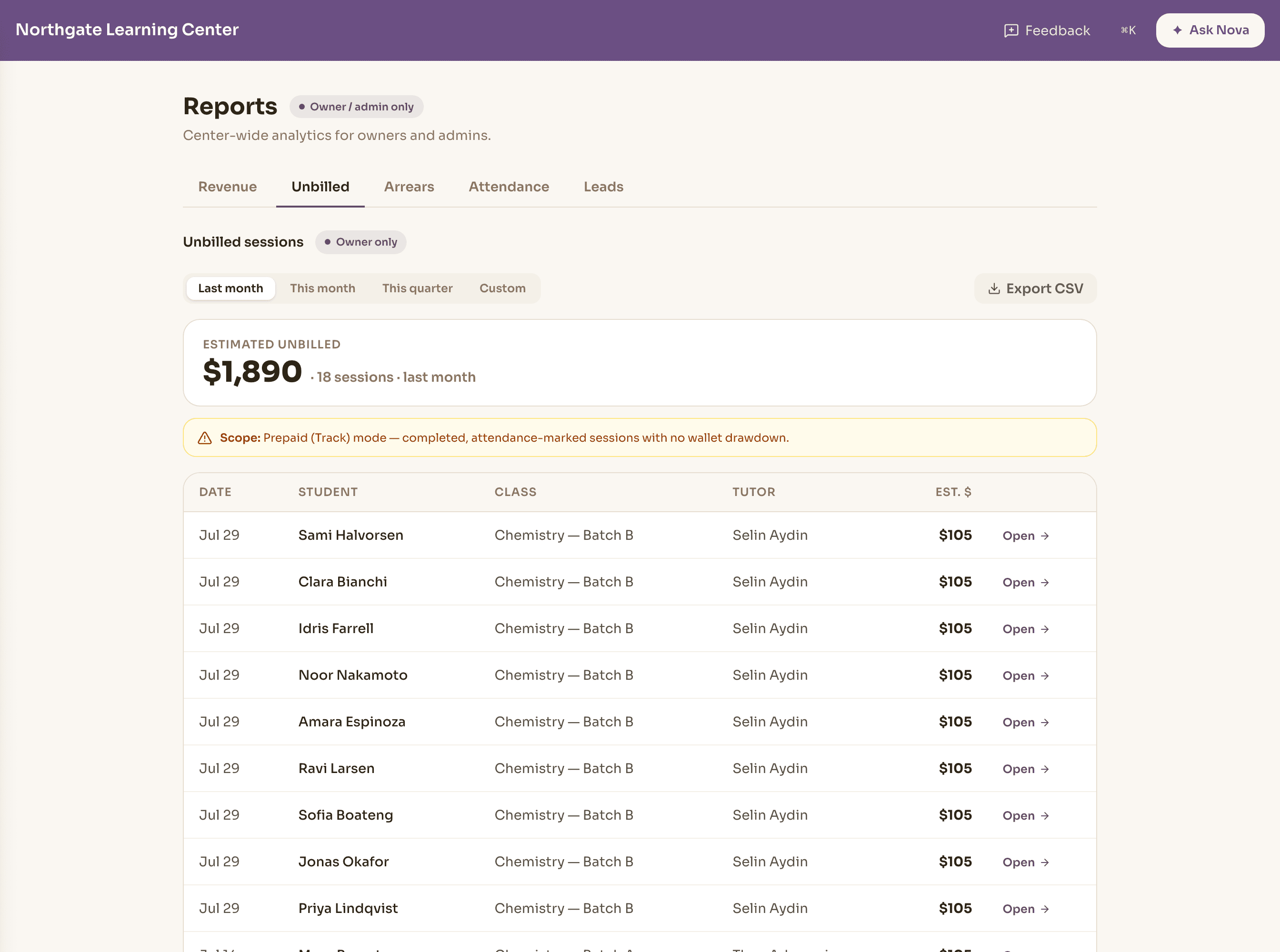
Which sessions did we teach but never bill?
Delivered sessions with no matching entry in the ledger, as a worklist you can act on — with an estimate of what they were worth.
Who owes us money right now?
A center-wide arrears rollup: total outstanding, per student, per class, and how far past due each one is.
Where is attendance slipping?
Center attendance across group and individual sessions, so a pattern shows up as a pattern rather than one tutor's hunch.
How many inquiries became students?
Stage counts, conversion rate and a breakdown by source, over the range you choose.
See the same center from different angles — without changing the answer.
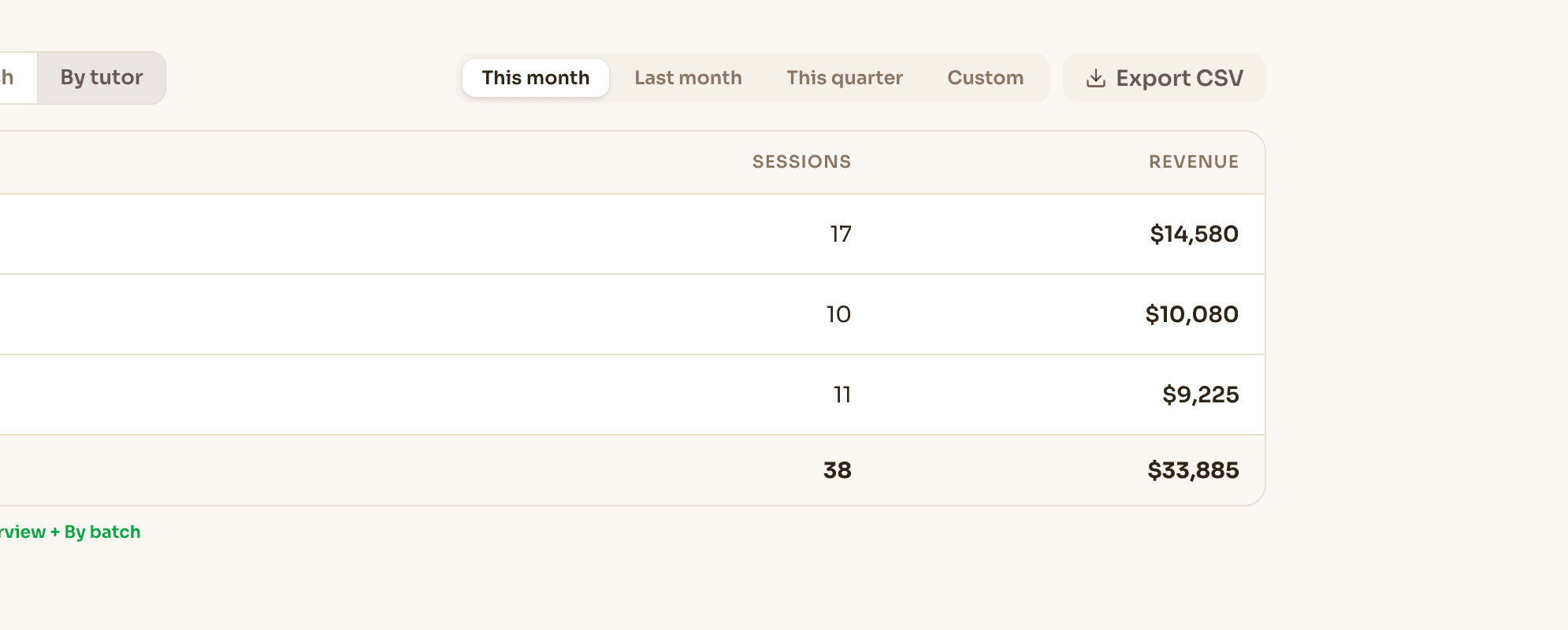
See what courses and batches earned, then look at the same period by the tutors who taught them. The breakdown changes. The total doesn't.
Revenue · this month
$33,885
- SAT Prep — Batch B4 sessions$4,680
- SAT Prep — Batch A4 sessions$4,680
- Chemistry — Batch B4 sessions$3,780
- Chemistry — Batch A4 sessions$3,780
- Algebra II — Batch B4 sessions$3,420
- + 4 more batches$13,545
A session with no assigned tutor shows as Unassigned — never dropped from the total.
Different question. Same underlying record.
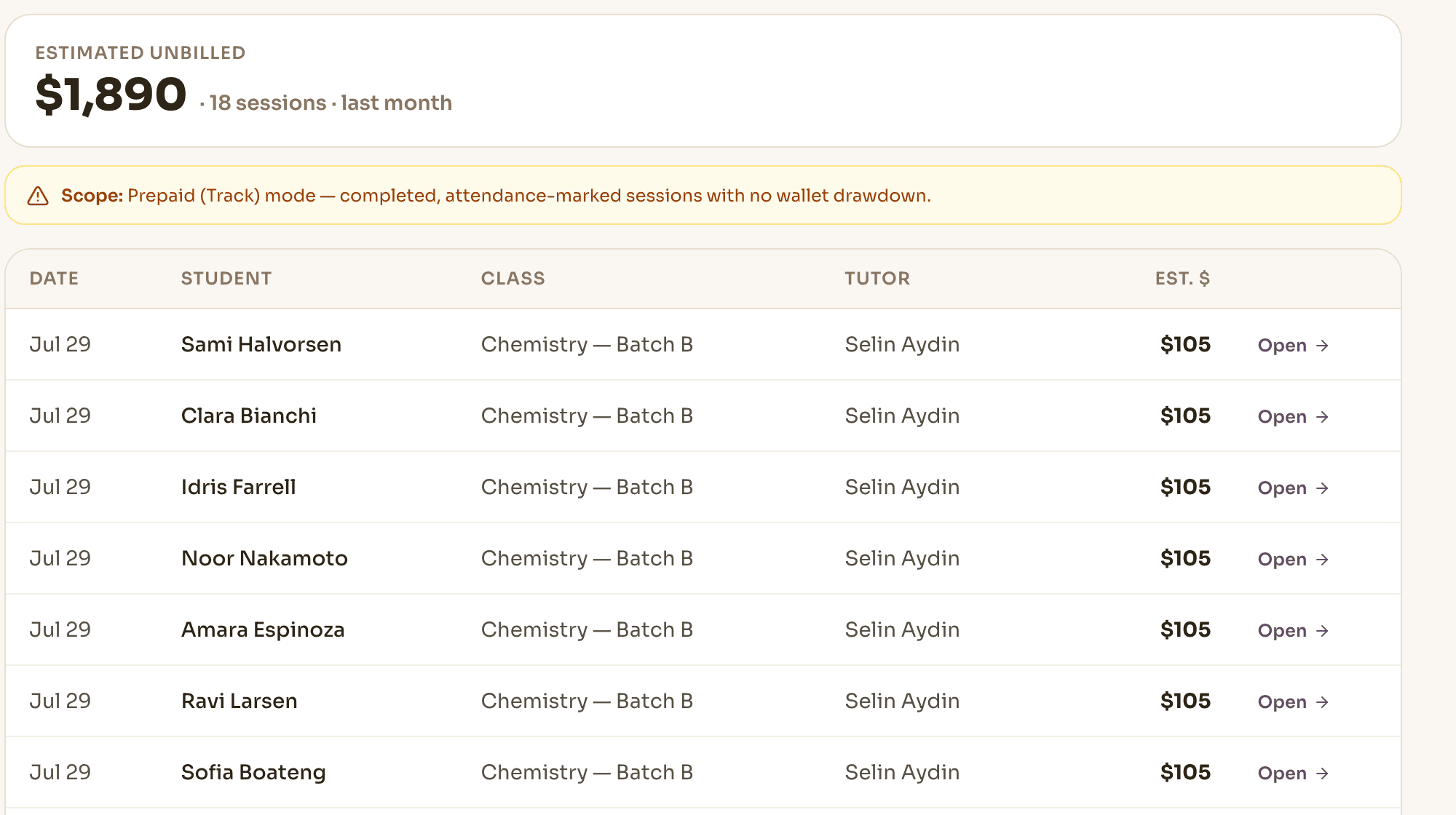
Find the work you delivered but never charged for.
Delivered sessions with attendance marked and nothing against them in the ledger — no payment, no charge, no package drawn down. Each row links back to the session so you can act on it rather than just read about it.
The report shows an estimate of what the work was worth, priced from your own fee structure, and it tells you which billing setups it covers. A leak report that overstates itself is worse than no leak report.
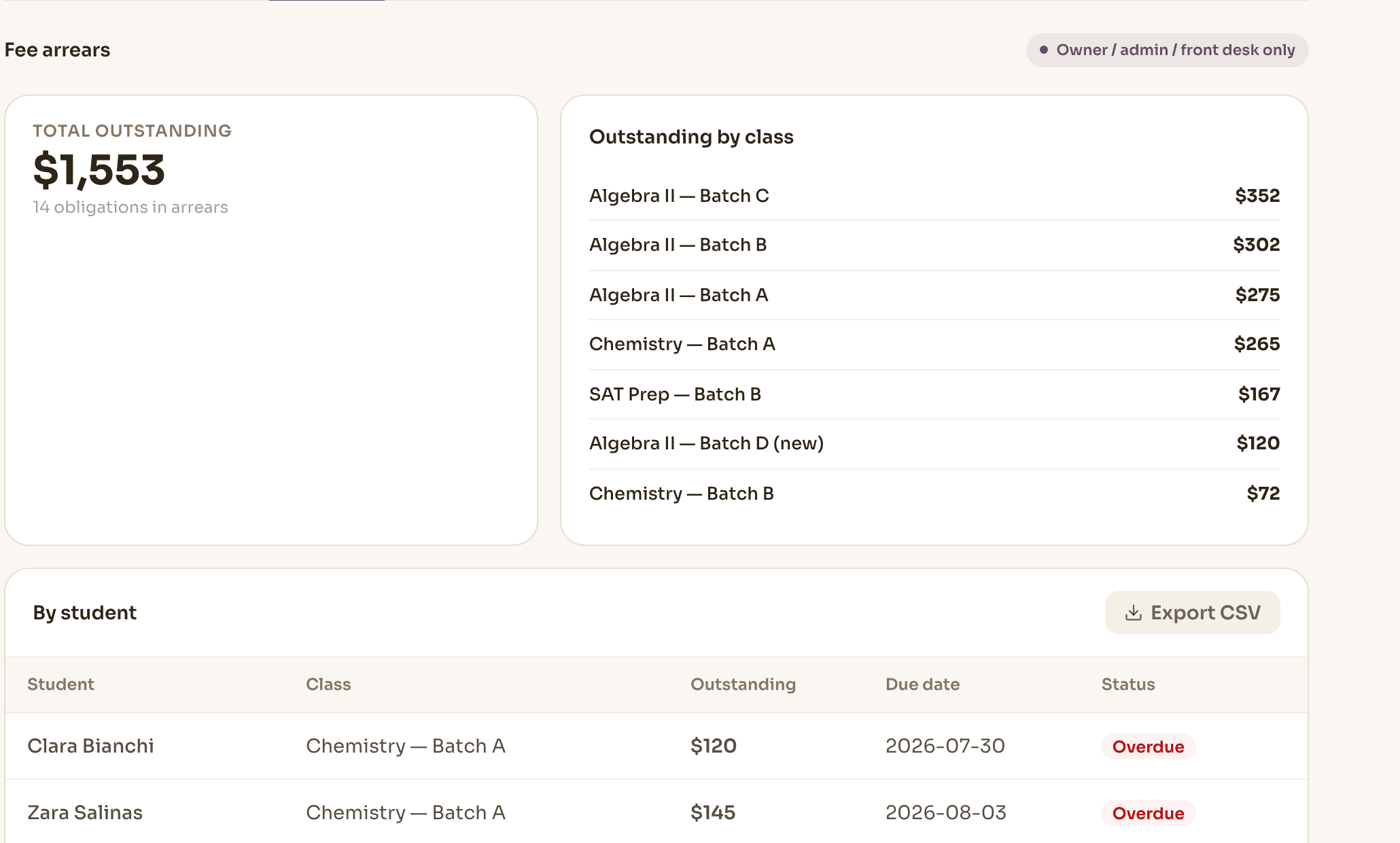
Who owes what, across the whole center.
One outstanding figure for the center — then the rows behind it: student, class, charged, paid, still owed, due date and how far past it.
The headline and every row underneath it come from the same ledger, so an owner goes from “$1,553 outstanding” to “who exactly makes up that $1,553?” without reconciling another spreadsheet.
- Total outstanding, plus a per-class rollup
- Due and overdue kept distinct, with aging visible
- Open to owners and admins — the people who chase it
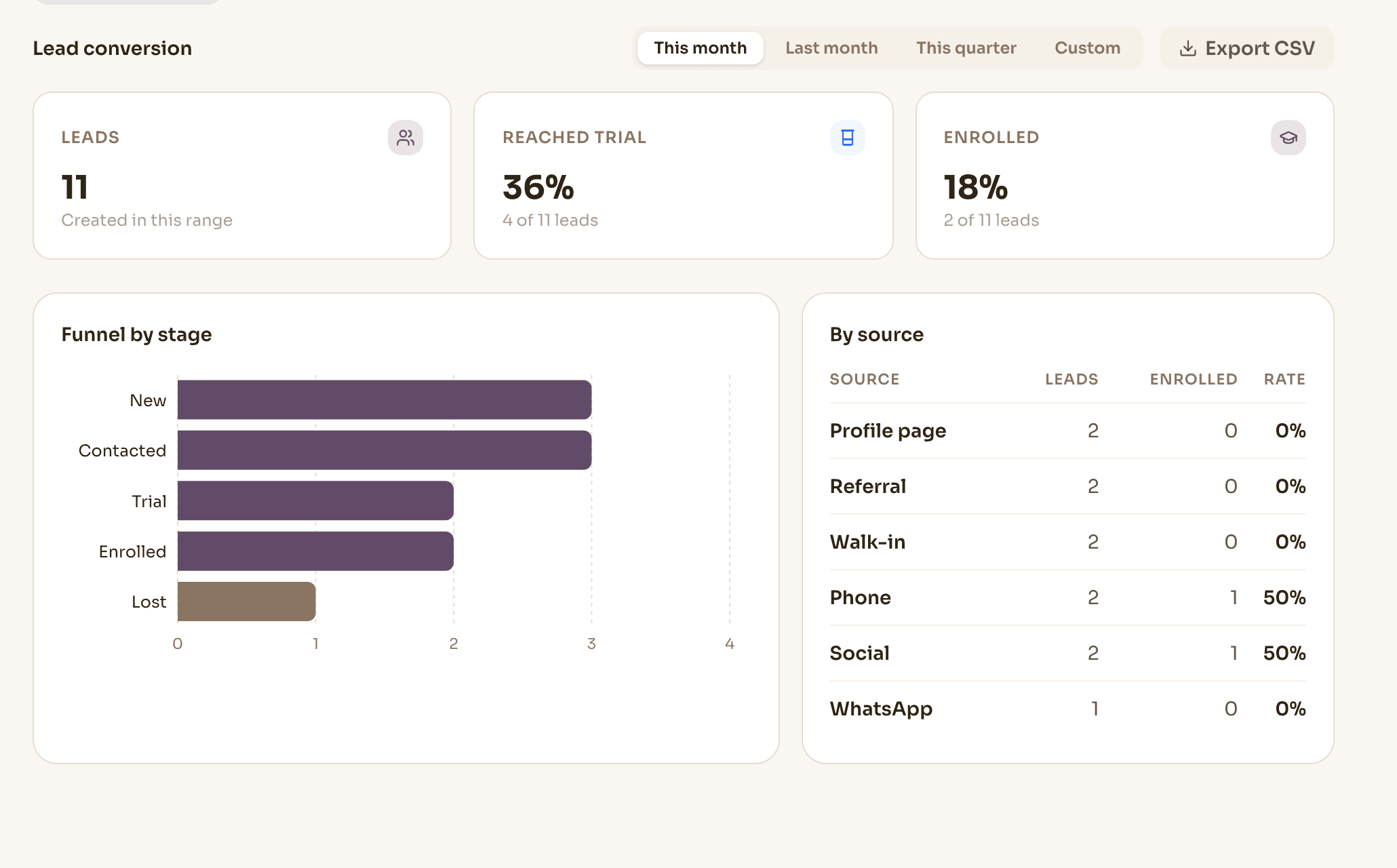
See patterns that are hard to notice one record at a time.
Center attendance across group and individual sessions, so absence patterns are visible at the center level rather than inside one tutor's roster.
And the funnel: how many inquiries arrived, how many reached a trial, how many enrolled, and which sources produced them.
- Deliveredattendance-marked sessions
- Billing signal checkedpayment, charge or drawdown
- 18 unbilled · $1,890an estimate, within a stated scope
Every row links back to the session it came from — a worklist to review, not a surprise at month end. And the report tells you which billing setups its estimate covers.
A report is only as good as where it reads from.
Nothing here is re-keyed. Every figure traces back to the moment the work was recorded.
- Scheduled
- Delivered
- Attendance
- Fees & tutor pay
- Payment
- Reports
The same operational record the attendance, billing, leads and staff pages describe — read as a report at the end, not maintained as a second copy. Enrollment feeds the funnel view along the same path.
Reporting isn't another place your team has to maintain. It's a view over the work they're already doing.
Reports tell you what happened. Nova brings forward what needs you.
Reporting gives you the factual view of the center. Nova reads signals from across that same connected operation to bring the important ones into your Brief — and lets you ask about them.
- Reporting13 families · $1,553
- Nova Brieffees need attention
- Askthe families most overdue
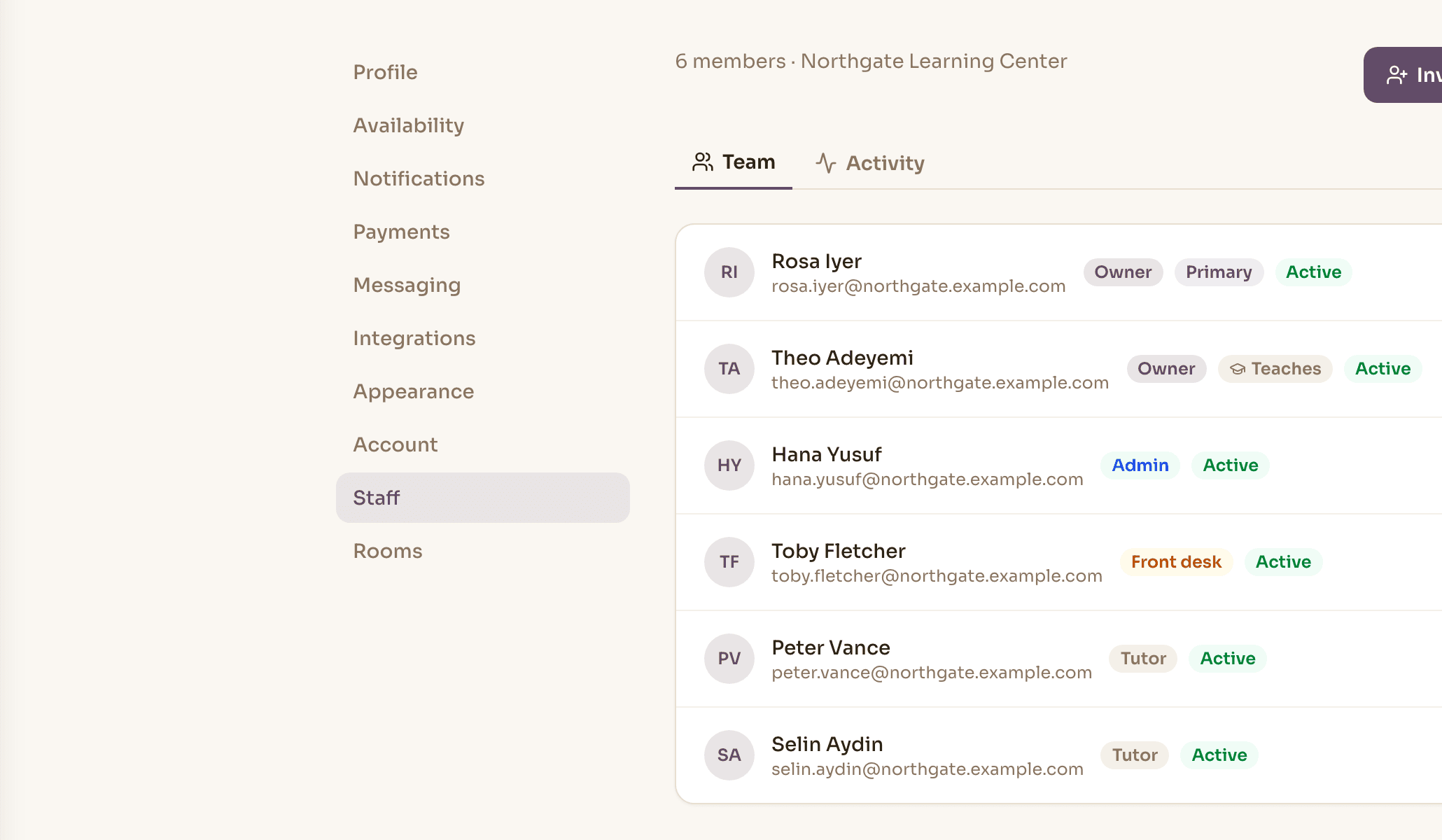
Not everyone should see the revenue.
Reports follow the same role model as the rest of Novano, and they follow it on the server — a report your role cannot see is not a hidden tab, it is a refused request.
Revenue and unbilled sessions are owner-only. Arrears and attendance open up to admins, because chasing fees and covering classes is their work. Each report carries a label saying who it is visible to.
Good to know
Do the breakdowns add up to the total?
Yes, by construction. Revenue by batch and revenue by tutor are one calculation re-bucketed, not two separate ones, so the same range always produces the same total however you slice it.
What counts as an unbilled session?
A delivered session with attendance marked and no billing signal against it — no payment recorded, no charge raised, no package drawn down. The report states which billing setups it covers, and the amount shown is an estimate from your own pricing, not an invoice.
Can my admin see revenue?
Not by default. Revenue and unbilled sessions are owner-only. Arrears and attendance are open to admins as well, because chasing fees and covering classes is their job. Each report shows who can see it.
Can I get the data out?
Revenue, arrears, unbilled sessions and lead conversion each export to CSV, with the same rows you can see on screen.
Do I need to enter anything to make these work?
No. Reports read the records your team already creates — sessions, attendance, fees and payments. There is no separate reporting step to keep up to date.
See these reports against your own numbers.
Bring a month you already know the answer to, and check ours against it.
Every new account gets 30 days free. A card is needed to start; cancel any time before day 30.